Case study · Tool I built
GuideCreator: from one screen recording to a finished SOP
Writing a standard operating procedure used to mean hours of screenshots, cropping, blurring client data by hand and re-recording videos. I built a tool that does the heavy lifting, so a process gets documented while it is being done.
The problem
Every agency I've worked with runs on processes that live in someone's head: how to add a contact, link a company, set up a pipeline. Writing them down is the job everyone puts off, because a good SOP takes a lot of small, slow steps.
- Taking and cropping a screenshot for every click
- Blurring client names, emails and phone numbers by hand
- Recording a video, then a second one when something was shown by mistake
- Keeping the written steps and the video in sync
What I built
One tool for both formats people learn from: a narrated video for watching, and step-by-step screenshots for following along.
Mark up a screenshot in seconds
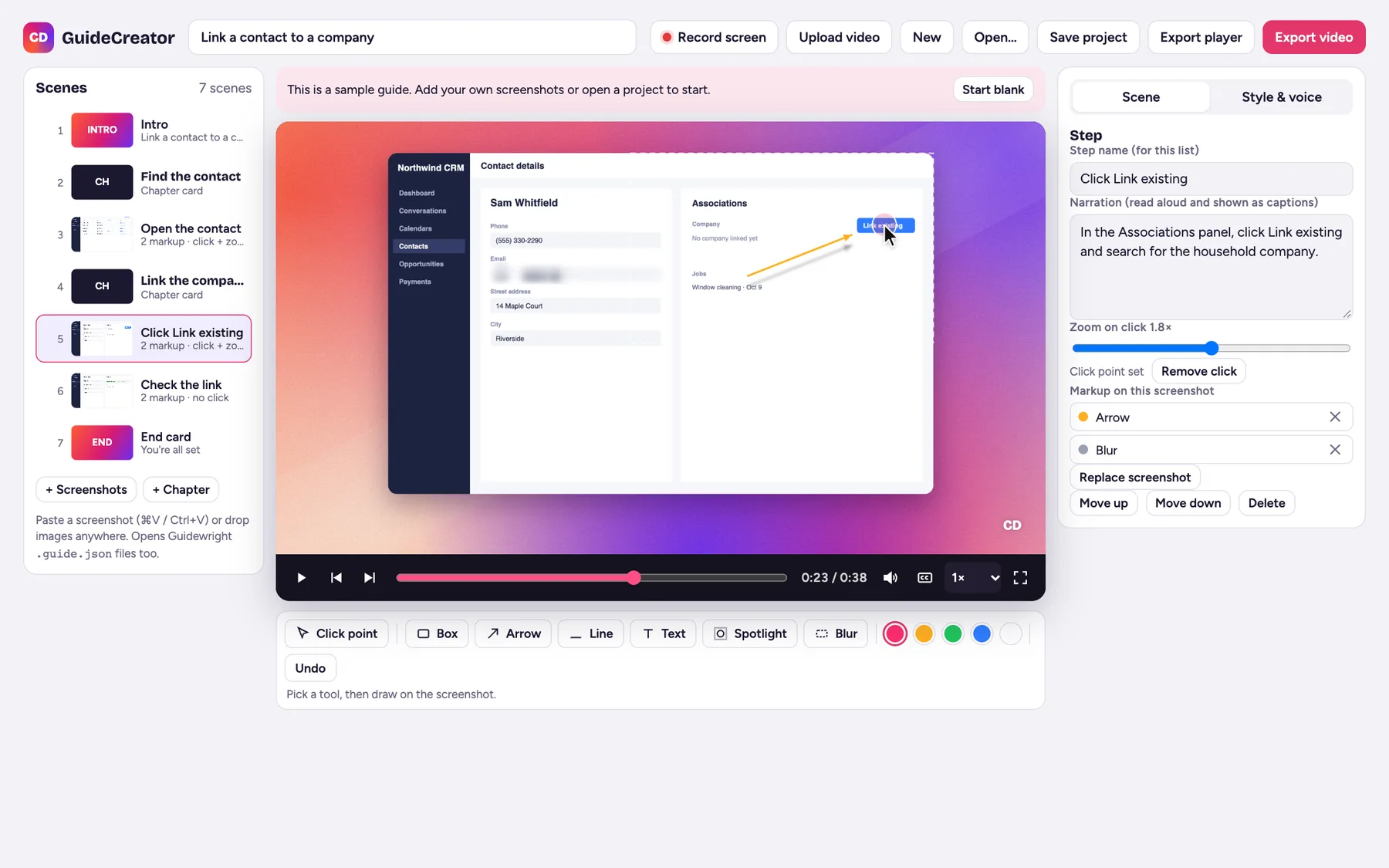
Drop or paste screenshots and each one becomes a step. Set where the cursor clicks and the camera zooms in there. Add boxes, arrows, labels and a spotlight, and blur anything private.
A voiceover and captions, written once
Type what each step says. GuideCreator reads it in a natural voice, shows word-by-word captions, and exports an MP4, a player page, or a help center article with the video on top and every step written out below.
Record your screen, Loom-style
Click Record screen, pick the whole screen, one window or one tab, and talk over it with your microphone. Pause and stop from a small bar, or upload a video you already have.
Blur client details, timed to the second
Pause where a phone number or email shows and drag a box over it. Each blur has its own start and end, shown on a timeline, so it covers the detail only while it is on screen.
Turn the video into guide steps
One click scans the recording, keeps each moment the screen changes and settles, and adds it as a guide step with its blurs already on. The video and the written SOP come from the same take.
How it works
- Step 01Record
Share a screen, window or tab and walk through the process once.
- Step 02Blur
Cover names, emails and phone numbers. Blurs follow the timeline.
- Step 03Steps
Turn the recording into screenshot steps with one click.
- Step 04Narrate
Write a line per step. The voice and captions are generated.
- Step 05Share
Export a blurred video, a narrated MP4, or a help article with the video on top.
The outcome
A process I walk through once becomes a blurred training video and a written, screenshot-by-screenshot SOP. Private client details are covered before anything is exported, and because the tool never uploads anything, it is safe to use with live accounts.
- One recording gives both a video and a step-by-step guide
- A ready-made help center article: video on top, numbered steps with screenshots below
- Blurs are timed, so the right detail is covered at the right moment
- Natural voiceover and captions without recording my own voice
- Works in Chrome or Edge with nothing to install
Try it yourself
Make your own guide
GuideCreator is free to use. Open it, record your screen or drop in a few screenshots, and turn them into a narrated video and a step-by-step guide.
- Nothing is uploaded or stored by me, so feel free to add real details
- Your work stays in your own browser until you clear it
- Best on a computer in Chrome or Edge (screen recording needs one)
Need your processes documented?
Let's turn your workflows into clear SOPs
I build the automations and I document them, so your team can run them without me.